Welcome!

Melezh is a server platform providing a unified configurable HTTP API for processing requests using arbitrary .os code or ready-made functions from the Open Integration Package. The system includes numerous tools for quickly and flexibly building your own service, as well as for its ongoing maintenance and administration
How It Works
The solution lets you create handlers for incoming HTTP requests based on methods from the Open Integration Package or functions from arbitrary OneScript modules. Each handler can be assigned a URL, method (GET, POST with JSON, or POST with form-data), and default parameter values. HTTP parameters map directly to the handler function's parameters without manual HTTP request handling. The system automatically processes data, maps addresses to assigned handlers, rejects requests with unsupported methods or invalid data, and logs all events. For convenient server management and log viewing, Melezh includes a built-in web console
Initial setup example
This example creates a new project file with a GET request handler configuration for the SendTextMessage function from the Telegram library. It also sets a default value for the token parameter with no overwrite capability ("strict")
melezh CreateProject       --path ./test_proj.melezh
melezh AddRequestsHandler  --proj ./test_proj.melezh --lib telegram --func SendTextMessage  --method GET
melezh SetHandlerArgument  --proj ./test_proj.melezh --handler 42281f11b --arg token --value "***" --strict true
melezh RunProject          --proj ./test_proj.melezh --port 7788
The handler will be available at localhost:7788/42281f11b, where 42281f11b is the identifier obtained when calling AddRequestHandler. This identifier serves both as the handler's configuration key and as the URL endpoint for requests
Request example for sending a text message:
http://localhost:7788/42281f11b?chat=123123123&text="Hello world!"
As you may have noticed, we're not passing the token as it's set by default
Web UI
In addition to the CLI interface, for easier interactive configuration and management, you can use the web console built into Melezh:
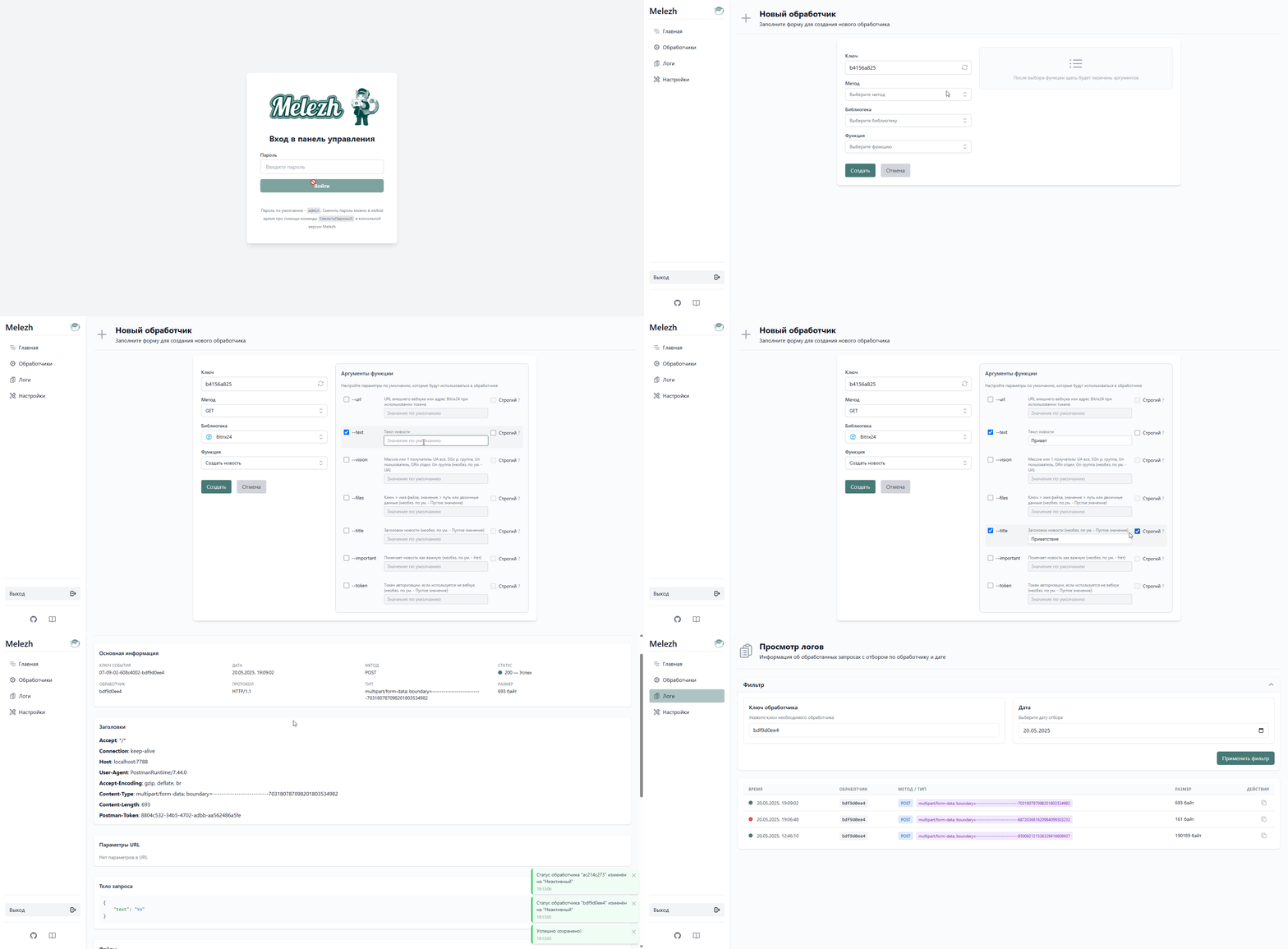
On the recording: logging into the console, adding a new handler for creating a Bitrix24 news item with two default parameters specified, disabling two handlers, viewing details of one of the recent events, reviewing all logs for one of today’s handlers
The web console allows you to:
- Monitor the server’s latest events
- Add, modify, and delete handlers, or adjust default parameter sets
- Temporarily enable or disable handlers
- View detailed logs for each processed request
- Modify server settings
If you’re just getting started with Melezh, this mode is recommended. Access the web console at localhost:<your_port>/ui after creating and launching the project