Installation
To start working with Melezh, you need to go through the installation procedure, after which you can create and configure a project. This section describes the process of installing Melezh on a specific device. The choice of one method or another depends on the operating system, as well as the availability of Docker or OneScript with the OPM package manager:
Installation in a container (recommended)
The easiest way to run Melezh with all necessary dependencies is using Docker. This can be done in one of the following ways:
- Get the image from GHCR and run the container:
    Instead of -deb you can specify -rpm to use rpm-based distribution
    Instead of -ru you can specify -en to get the English version
    Instead of latest you can specify a specific version of Melezh
    Port 1921 - main port of Melezh http-server
    Port 1931 - debug port for connecting OneScript Debug Adapter for VS Code during operation. See Debugging section for details

    docker pull ghcr.io/bayselonarrend/melezh:latest-deb-en
    docker run -d -p 1921:1921 -p 1931:1931 --name melezh ghcr.io/bayselonarrend/melezh:latest-deb-en
- Download the zip archive with Dockerfile (
melezh-docker-ru.zipormelezh-docker-en.zip) from the repository release on Github. The archive needs to be unpacked, after which you should run one of the installation scripts located there -batorsh, depending on the OS being used
Installation on local machine
You can also install Melezh as a OneScript package or application on a local machine in one of the following ways:
OneScript
Melezh and OInt are primarily packages for OneScript, which can be installed using the OPM package manager. The Russian version of the package can be installed from the cloud package hub using the console command:
opm install melezh
This package already has dependencies on OInt and OInt CLI - they will be installed automatically
In addition to getting from the cloud, both English and Russian versions can be installed from local .ospx package files, which are located in the releases of the corresponding repositories Melezh and OpenIntegrations:
opm install -f oint-x.x.x_lang.ospx
opm install -f oint-cli-x.x.x_lang.ospx
opm install -f melezh-x.x.x_lang.ospx
Each version of melezh is compatible with the corresponding version of oint provided the package languages match. For example, the Russian version of Melezh 0.8.0 is compatible with the Russian version of oint 1.31.0, version 0.9.0 - with 1.32.0, etc. The latest version of Melezh is always compatible with the latest version of oint and is always released simultaneously with it. When updating melezh to a newer version, the oint and oint-cli packages must also be updated. The same applies in reverse
Windows
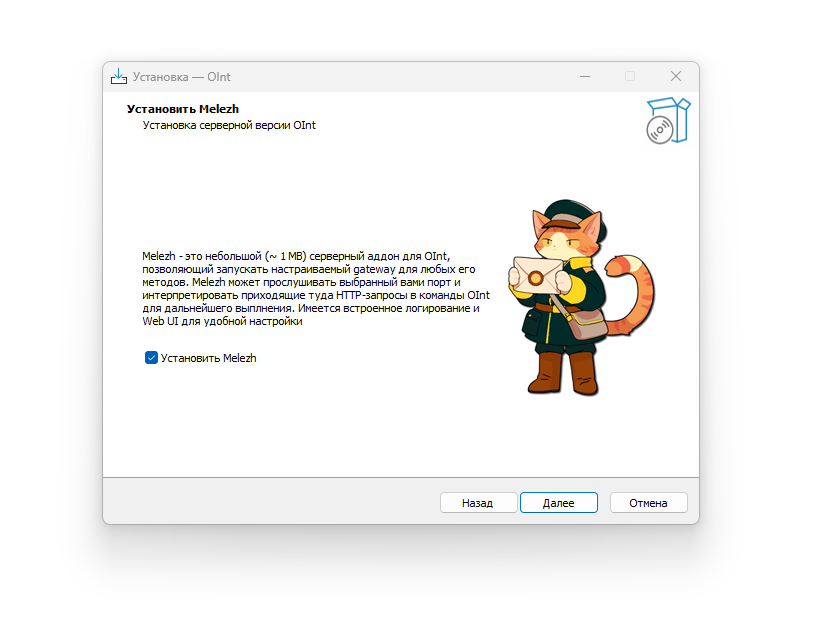
Installing Melezh on Windows is done during the installation of oint - the main console application of the Open Integration Package. Simply download the oint installers from the OpenIntegrations repository release (v >= 1.24.0), then during installation, check the box on the page asking about additional Melezh installation:
Linux
To install Melezh on devices with Linux OS, .deb and .rpm packages are available in the Melezh repository releases. Both depend on the oint package, which in corresponding (.deb or .rpm) variants can be found in the OpenIntegrations repository releases
As with OneScript packages, it is important to maintain correspondence of version numbers and language versions